Set up Playlist Sync
Automatically add recent releases to an existing playlist while leaving its original tracks in place.
Using your phone? Open these settings in the Songstats app, or use the links below on a computer.
Open Profile Settings → Playlist Sync for your artist or label. Choose an offered platform, connect the account that can edit the playlist, then select the playlist and the insertion options offered. Enable and save the setup.
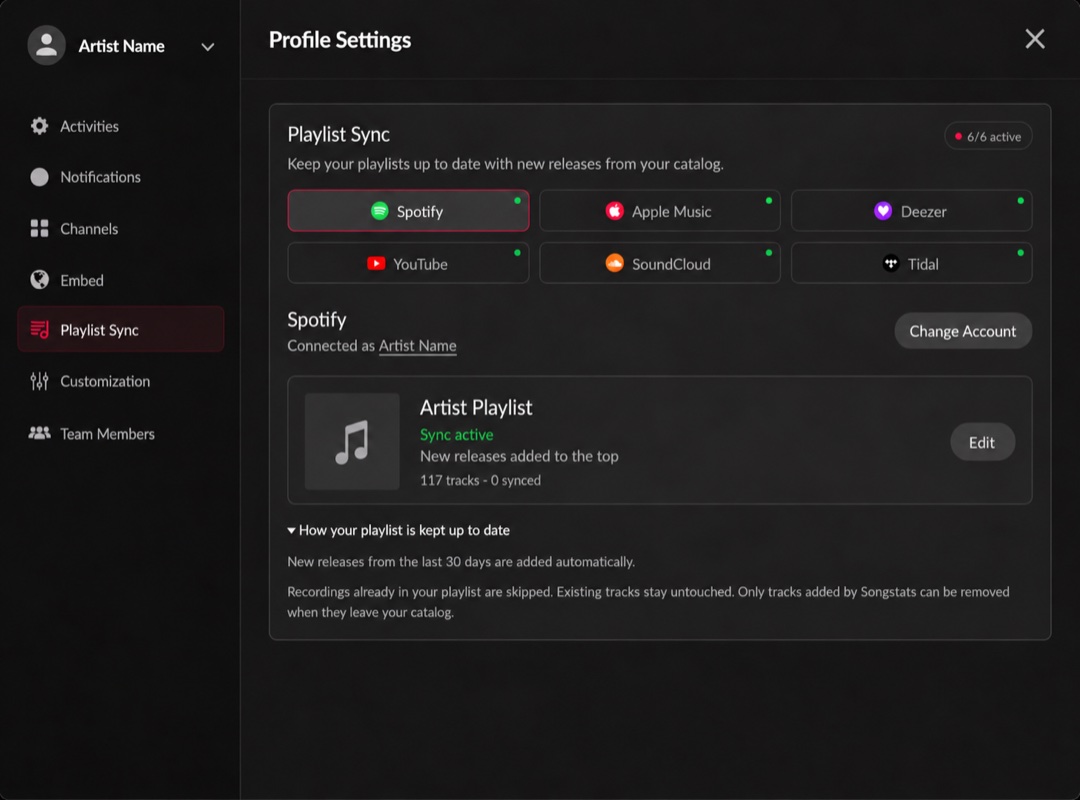
Sync recent releases to an existing Spotify playlist. Click the image to enlarge it.
What gets added? New releases from the last 30 days, as your catalog updates. Recordings already in the playlist are skipped. This is not an automatic import of your entire back catalog.
What can be removed? Existing tracks stay untouched. Where the platform supports removal, only tracks added by Songstats can be removed when they leave your catalog.
The website currently offers Spotify, Apple Music, Deezer, YouTube, SoundCloud and TIDAL. Available controls differ by platform. If Playlist Sync is not shown, ask Support about access for your profile.
If additions stop, check the connection and catalog import, then send Support the profile and playlist links.